






How to log in after purchasing google series account (gmail, youtube, Gv)?
First, clarify the login addresses of these accounts:
gmail(https://gmail.com) youtube( https://youtube.com) google voice(https://voice.google.com)
google,gmail Google mailbox, youtube, google voice will provide a card code for you after purchase, the card code information includes the following information:
- Email account
- Password
- Auxiliary email
- Registration region (some shipments do not include)
- Registration time (some shipments do not include
Phone number (only google voice products include)
The separator is "|" as shown in the image below:
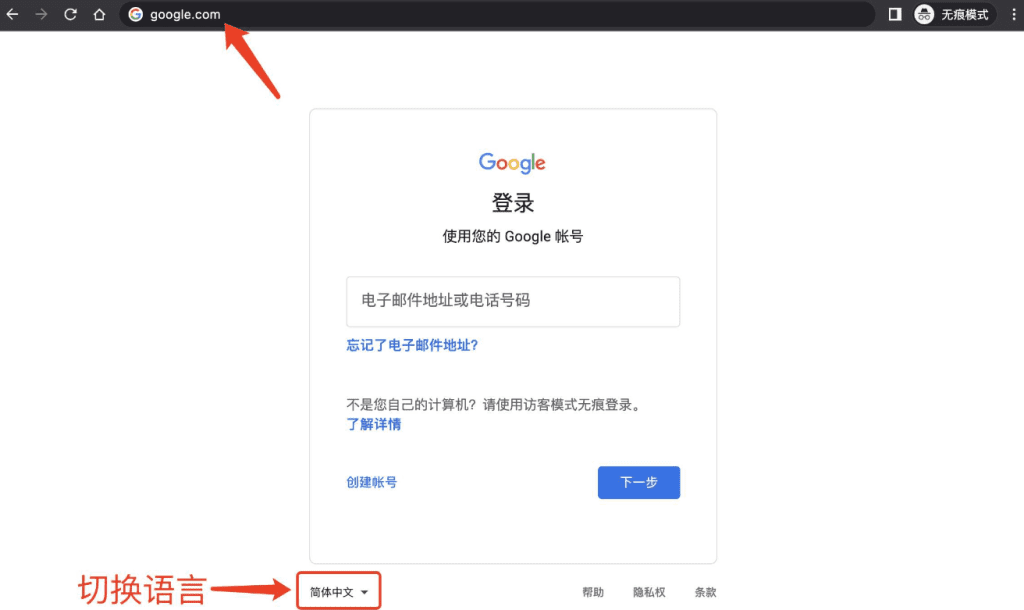
 Step 1: The Gmail/google login website is the Google official website:https://www.google.com/account
It is recommended to switch the language to Chinese to avoid misunderstanding.
Step 2: Select "Confirm your auxiliary email" → Enter the auxiliary email to complete the login. (This step appears randomly, and it may not require confirmation of the auxiliary email, mainly based on whether the current login environment is safe, Google decides whether to require re-confirmation of identity verification steps. It does not mean that the account has a problem)
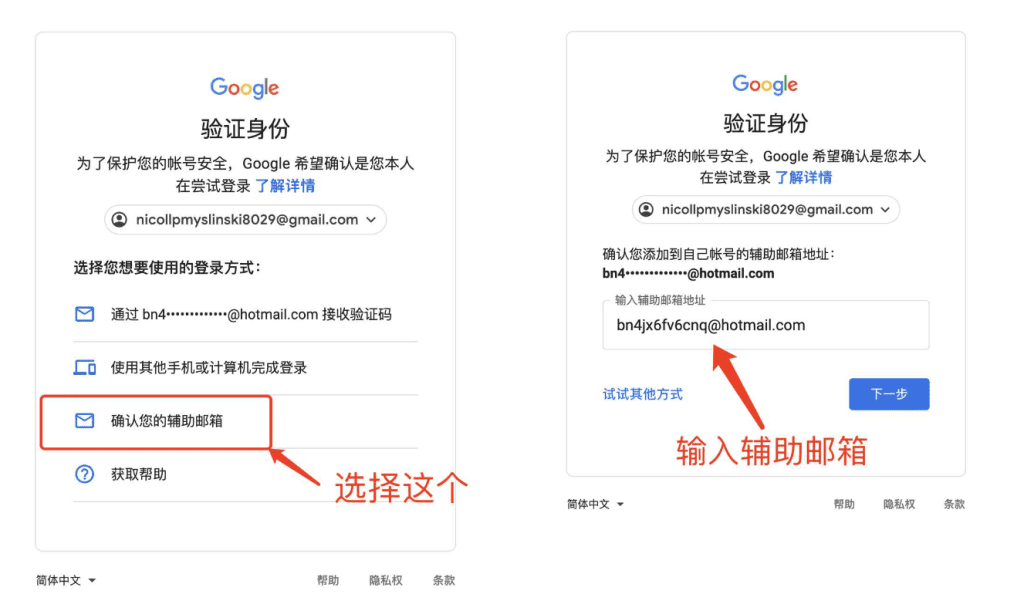
After this, the login is complete.